
Publish-ready assets: Your complete guide to flawless visuals
Learn what publish-ready assets really mean, how to avoid technical rejections, metadata errors, and AI pitfalls, and build a reliable workflow from draft to distribution.

TL;DR:
- Publish-ready assets are finalized files that meet technical, metadata, and rights clearance standards.
- A disciplined workflow ensures assets are properly formatted, tested, and approved before release.
- AI tools speed up creation but still require manual review to ensure publication readiness.
You’ve spent days perfecting a visual, a track, or a promo pack. Then the platform rejects it. Or worse, it goes live with a metadata error that quietly costs you royalties you’ll never recover. Publish-ready assets are one of the most misunderstood concepts in the creator workflow. Most people assume “done” means ready. It rarely does. Technical rejections, AI rendering quirks, and rights clearance gaps are far more common than creators expect. This guide breaks down exactly what publish-ready means, how to build a reliable path from draft to distribution, and which pitfalls to eliminate before they cost you time, money, or your audience’s trust.
Table of Contents
- What does ‘publish-ready’ actually mean?
- Core steps: How to make assets ready for publication
- Common pitfalls: Why assets fail at the finish line
- The evolving role of AI in publish-ready asset creation
- Our take: The uncomfortable truth about ‘publish-ready’ most guides miss
- Level up your creative workflow with Orias AI
- Frequently asked questions
Key Takeaways
| Point | Details |
|---|---|
| Double-check file specs | Technical requirements and platform standards are the most frequent source of rejected assets. |
| Separate draft from final | Always keep a clear division between work-in-progress and your true publish-ready files for smooth approval. |
| Use AI with human review | Leverage AI but never publish AI-generated assets without manual quality checks and approval. |
| Update your workflow | Incorporate approval loops, metadata validation, and format testing at every stage to prevent costly mistakes. |
What does ‘publish-ready’ actually mean?
Now that you recognize the stakes, let’s pin down exactly what makes an asset truly publish-ready.
A publish-ready asset is a finalized, public-facing creative file, whether that’s an image, audio track, or video, that has been formatted, technically tested, and rights-cleared for distribution. It is not a polished draft. It is not an AI-generated output you haven’t reviewed. It’s the version that can go live without any further changes.
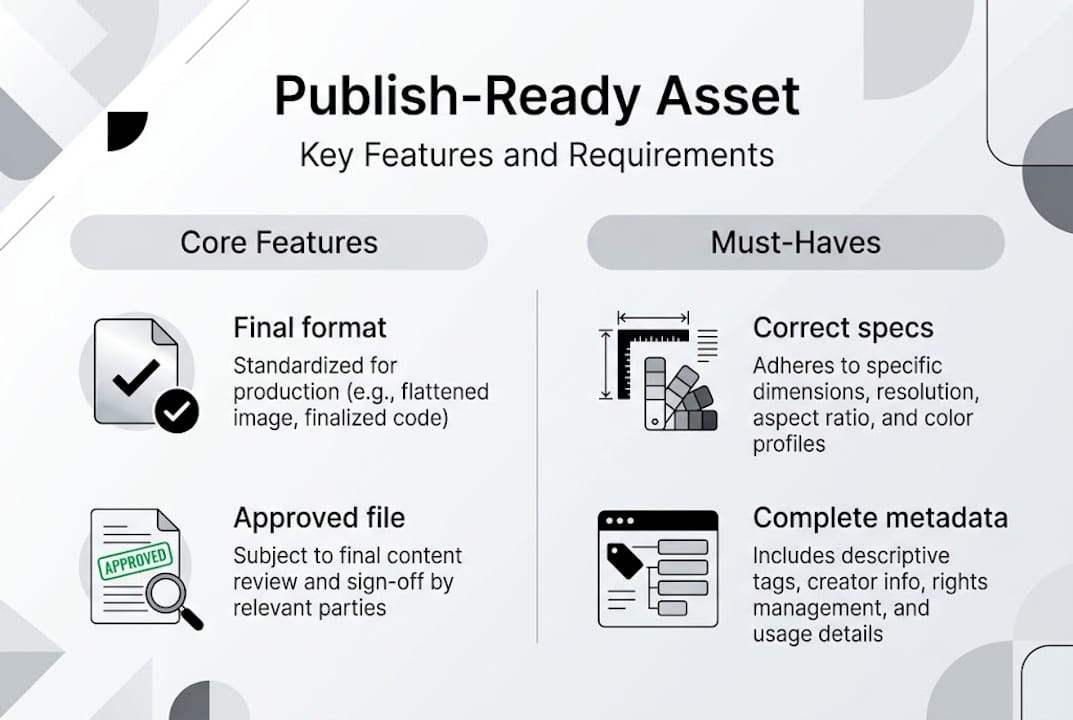
The confusion usually starts when creators treat their best-looking draft as the final product. A file can look stunning in your editing software and still fail on upload because the color profile is wrong, the resolution doesn’t match platform specs, or the embedded metadata is incomplete. These aren’t creative failures. They’re process failures.
Understanding the publishing assets process means recognizing that publication is its own phase, separate from creation. When you master creative workflows, you build that separation into your process by design.
Here’s a quick breakdown of what separates publish-ready from work-in-progress (WIP):
Publish-ready assets:
- Correct file format and resolution for the target platform
- Accurate, complete metadata (title, artist, copyright, ISRC for audio)
- Rights cleared or licensed for the intended distribution channel
- Passed technical QA on color profile, bitrate, and aspect ratio
- Approved by all necessary stakeholders
Work-in-progress assets:
- Still in native editing format (PSD, Logic Pro session, Premiere project)
- Placeholder text, temp audio, or unresolved design elements
- Metadata fields empty or auto-filled with software defaults
- Not yet reviewed for platform-specific requirements
As the GTM Marketing Assets Guide makes clear, separating work-in-progress from publish-ready materials, and using a digital asset management (DAM) system for approvals and rights tracking, is a foundational practice for teams that release content consistently.
Pro Tip: Create two clearly labeled folders in your storage system: “Studio” for everything in progress, and “Release” for approved, publish-ready files only. Never move a file to Release until it has passed every check on your QA list.
Core steps: How to make assets ready for publication
With the definition clear, here’s exactly how to take your asset from draft to green-lit for release.
The path from raw file to publish-ready isn’t complicated, but it does require discipline. Skipping even one step is where most publishing failures originate. Here’s a practical numbered workflow you can apply to any asset type:
- Lock the final creative draft. No more design changes after this point. Treat this as your creative freeze.
- Convert to the correct file format. Export from your native tool into the required delivery format (JPEG, PNG, MP3, WAV, MP4, etc.).
- Check technical specs. Verify resolution, bitrate, frame rate, aspect ratio, and file size against platform requirements.
- Complete all metadata fields. Title, description, tags, copyright holder, release date, and for audio, ISRC codes.
- Run a rights and licensing check. Confirm every element, including fonts, samples, stock imagery, and music, is cleared for your intended use.
- Perform platform-specific QA. Test how the asset renders in the actual upload environment, not just locally.
- Get stakeholder sign-off. Even solo creators benefit from a second set of eyes before publishing.
Here’s a quick reference for platform specs you’ll encounter most often:
| Platform | Image spec | Audio spec | Video spec |
|---|---|---|---|
| 1080x1080px, JPEG/PNG | N/A | MP4, H.264, 30fps max | |
| Spotify | 3000x3000px, JPEG | WAV/FLAC, 16-bit | N/A |
| YouTube | 1280x720px minimum | AAC, 192kbps+ | MP4, H.264, up to 4K |
| TikTok | 1080x1920px | MP3/AAC | MP4/MOV, 9:16 ratio |
Following metadata and workflow tips from established publishing systems helps you avoid the silent errors that don’t trigger an upload rejection but do cause downstream problems like royalty misattribution. Understanding digital content workflow basics and applying creative process best practices will reinforce every step here.
As the GTM Marketing Assets Guide confirms, approvals, rights management, and technical review are not optional extras. They’re the core of a reliable publishing workflow.
Pro Tip: Before final sign-off, run a “triangle test.” Take one asset and export it in three different formats for three different platforms. If all three pass QA, your source file is solid. If one fails, you’ve caught the issue before it goes live.
Common pitfalls: Why assets fail at the finish line
Even the best workflows can falter. Let’s prevent classic mistakes by learning from common real-world failures.
Most publishing failures aren’t dramatic. They’re quiet. A color profile set to CMYK instead of RGB. A metadata field left blank. An AI-generated image with distorted text that nobody caught in the final review. These small oversights compound into real consequences: rejected uploads, delayed releases, and lost revenue.
Metadata mismatches causing royalty loss, non-RGB art getting rejected, AI inconsistencies in hands and text, wrong platform ratios, and unprotected publish access are among the most documented edge cases creators face. And 67% of underperforming videos have script or structural issues that could have been caught before release.
Here’s a comparison of the most common pitfalls and their fixes:
| Pitfall | What goes wrong | Fix |
|---|---|---|
| Wrong color profile | Art rejected or colors shift on screen | Always export in RGB for digital, CMYK only for print |
| Metadata mismatch | Royalties misrouted or lost | Fill all fields manually, don’t rely on software defaults |
| AI rendering errors | Distorted hands, garbled text in visuals | Run a visual QA pass specifically for AI artifacts |
| Unoptimized file size | Upload timeouts or compression artifacts | Compress before upload using platform-approved tools |
| Wrong aspect ratio | Cropped or letterboxed output | Check ratio requirements per platform before export |
Edge cases to double-check before every publish:
- Boundary inputs: if a field accepts values from 1 to 100, test what happens at 0 and 101. Some platforms silently reject or truncate out-of-range values.
- AI-generated text within images: always verify it reads correctly at small sizes.
- Linked assets: if your file references external fonts or media, confirm those are embedded.
- Access permissions: make sure the published asset is accessible to the intended audience, not locked behind internal permissions.
For promo visuals best practices and visual tips for music releases, the principle is the same: creative quality and technical accuracy are both required. One without the other will cost you.
The evolving role of AI in publish-ready asset creation
Technology is rapidly changing how creators work. Here’s the truth about using AI for ready-to-publish assets.
AI tools have genuinely changed what’s possible for solo creators and small teams. You can generate visual concepts, batch-process style variants, and iterate on mood and composition faster than ever. That’s real. But AI is not a shortcut past the publish-ready process. It’s a powerful drafting tool that still requires human judgment at the finish line.
Here’s an honest breakdown of where AI helps and where it falls short:
What AI speeds up:
- Generating initial visual concepts and style directions
- Producing multiple caption or copy variants quickly
- Batch-resizing or reformatting assets for different platforms
- Creating storyboard drafts and mood references
- Suggesting color palettes and visual identity options
What still needs manual review:
- Text rendered inside images (AI frequently distorts letters)
- Human anatomy, especially hands and faces at close range
- Rights and licensing status of AI-generated elements
- Metadata accuracy (AI tools rarely populate this correctly)
- Platform-specific technical specs and compliance
For visual storytelling with AI and even captioning strategies, AI accelerates the creative layer. But the publishing layer still demands your attention.
As Adobe Experience Manager notes, AI-generated content is promising but not fully production-ready without refinement and structured review processes.
Practically, this means building a QA pass specifically for AI artifacts into your workflow. Look at every AI-generated visual at 100% zoom. Read every piece of AI-rendered text out loud. Check that any AI-composed audio doesn’t contain artifacts or clipping. AI gets you 80% of the way there faster. Your review process closes the remaining gap.
Our take: The uncomfortable truth about ‘publish-ready’ most guides miss
Checklists are necessary. Automation is useful. But neither one can fully replace the contextual judgment you bring as a creator.
Here’s what most guides skip: publish-ready is not just a technical status. It’s also an audience-specific judgment call. An asset that performs perfectly for one release might fall flat in a different market, genre, or platform context, even if it passes every technical check. We’ve seen creators follow flawless workflows and still miss the mark because they tested against platform specs but not against real audience expectations.
The hard-won lesson is this: build a small feedback loop between “publish-ready” and true public launch. Share the asset with a trusted group, a few fans, a collaborator, or even a small paid test audience, before full release. What you learn in that window is often more valuable than any checklist item.
Following structured creative workflows gives you the technical foundation. But ongoing QA, real-world testing, and the willingness to adapt after each release are what separate creators who grow consistently from those who stay stuck at “good enough.”
Level up your creative workflow with Orias AI
Ready to streamline your asset workflow with less guessing?
Orias AI is built for exactly this kind of work. The platform takes your references, rough ideas, and creative directions and turns them into structured visual and promotional assets, already organized for iteration and export. You get multiple variants, platform-ready formats, and a focused workspace that keeps your creative process moving without the chaos.

Instead of juggling separate tools for ideation, formatting, and QA, you work inside one AI creative workspace designed to reduce the friction between concept and publication. Whether you’re preparing a music release, a campaign drop, or a visual identity rollout, Orias AI helps you move from idea to publish-ready faster, and with more confidence in the output.
Frequently asked questions
What is the main difference between publish-ready assets and work-in-progress assets?
Publish-ready assets are finalized, formatted materials approved for public release, while work-in-progress assets are drafts or internal versions not yet cleared for distribution.
How can I avoid having my assets rejected by platforms?
Use checklists for format, metadata, and technical specs, and verify platform-specific ratios and color profile requirements before every upload.
Is AI good enough for making assets truly publish-ready?
AI can accelerate drafting and style iteration, but AI without refinement is not production-ready. Manual QA is still required before any public release.
What are some common pitfalls that lead to royalty loss or failed releases?
Mistakes like metadata mismatches and royalty loss, incorrect color profiles, and uncleared rights are the most common causes of failed or undermonetized releases.


