
Master the creative workflow for YouTube: a practical guide
Learn how to build a repeatable YouTube creative workflow with batching, visual templates, and AI tools to boost consistency, clarity, and channel growth.

Missing uploads, inconsistent quality, and creative burnout are not signs of failure. They are signs of a missing system. Most YouTube creators, regardless of channel size, hit a wall when they try to scale output without a repeatable process behind it. The good news is that a structured approach changes everything. 6-7 repeatable phases form the backbone of every high-performing YouTube workflow, and once you understand them, you can apply them immediately to produce cleaner, more consistent content without burning out.
Table of Contents
- Understanding the creative workflow for YouTube
- Preparation: Laying the groundwork for success
- Executing your workflow: Step-by-step to publication
- Troubleshooting: Common mistakes and how to fix them
- Measuring results and evolving your process
- Take your YouTube workflow further with Orias AI
- Frequently asked questions
Key Takeaways
| Point | Details |
|---|---|
| Follow clear workflow stages | A repeatable, structured process boosts both creative clarity and channel growth. |
| Plan and batch ahead | Batching and buffer-building save hours and prevent burnout for YouTube creators. |
| Balance evergreen and trends | A 70/30 content mix ensures consistent performance while letting you catch hot topics. |
| Use visual templates | Consistent assets raise your channel’s brand recognition and viewer trust. |
| Review and refine regularly | Analytics review lets you figure out what’s working so you can improve every cycle. |
Understanding the creative workflow for YouTube
Let’s start by clarifying what a complete YouTube creative workflow actually looks like and why each phase matters. A workflow is not just a to-do list. It is a repeatable system that moves your idea from concept to published video with as little friction as possible.
The YouTube creative workflow phases typically break down into these core stages:
- Ideation and research: Identifying topics, validating demand, and sourcing reference material
- Planning and outlining: Structuring your video’s narrative arc and key talking points
- Scripting: Writing or bullet-pointing your delivery for clarity and retention
- Production: Filming, recording voiceover, or capturing screen content
- Editing and post-production: Assembling footage, color grading, adding graphics and music
- Upload and optimization: Writing titles, descriptions, tags, and thumbnails
- Analytics and review: Measuring performance and feeding insights back into the next cycle
Here is how the traditional approach compares to a more efficient model:
| Workflow element | Traditional process | Efficient batch or AI-supported model |
|---|---|---|
| Ideation | Ad hoc, reactive | Scheduled sessions, content pillars |
| Scripting | Per video, unstructured | Templated, batched in one session |
| Production | One video at a time | Multiple videos filmed per shoot day |
| Editing | Manual, inconsistent style | Template-driven, reusable assets |
| Optimization | Guesswork | Data-informed, keyword-researched |
| Review | Rarely done | Built into weekly or monthly cadence |
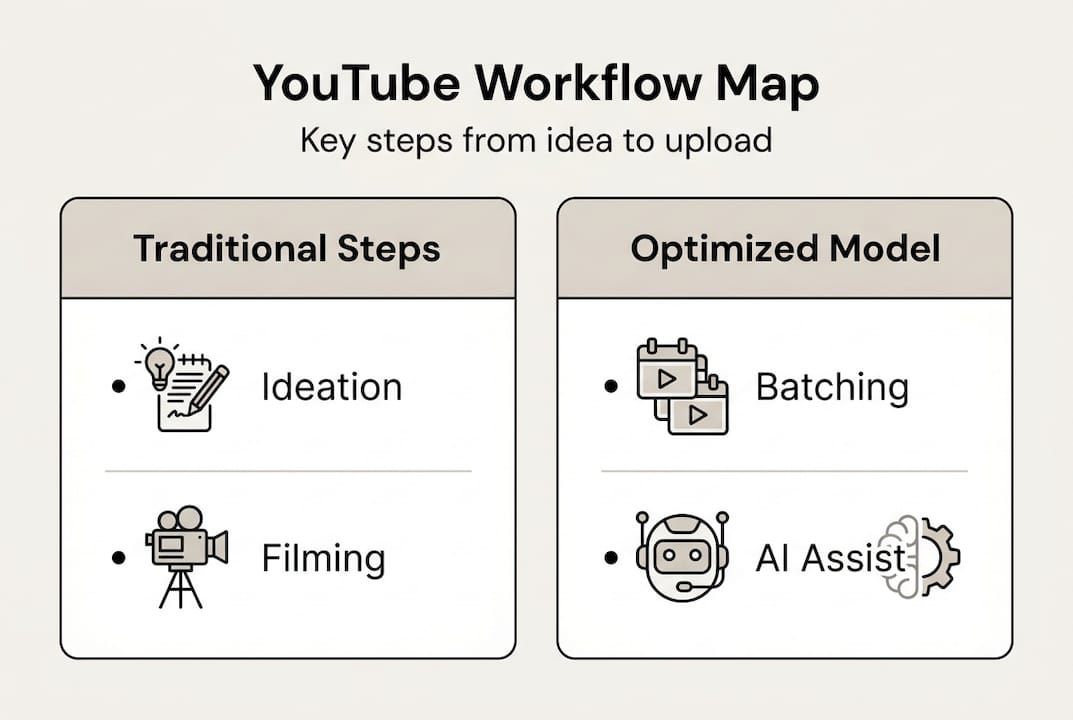
Understanding this map is the first step. Each phase feeds the next, and skipping any one of them creates a bottleneck that shows up later as poor retention, missed uploads, or visual inconsistency. A solid content creation workflow treats every phase as non-negotiable.
Preparation: Laying the groundwork for success
Now that you know what the workflow includes, let’s look at what you need to set up before hitting record. Preparation is where most creators lose time without realizing it. Skipping planning does not save time. It borrows it from your future self at a high interest rate.
Batching is one of the most effective methodologies available to solo creators. Consolidating scripting, filming, and editing into dedicated sessions removes the mental overhead of context-switching every single day. You stop starting from zero each time.
Here is a pre-production checklist to build your foundation:
- Define 3 to 5 content pillars that anchor your channel’s identity
- Build a content calendar with at least four weeks of planned topics
- Create visual templates for thumbnails, lower thirds, and end screens
- Set up an asset library for music, b-roll, and brand elements
- Establish a consistent upload schedule and protect it
The 70/30 rule is worth building into your calendar from day one. Seventy percent of your content should be evergreen topics that stay relevant for months or years. The remaining thirty percent can respond to trends or timely events. This split keeps your channel stable while still allowing you to capitalize on momentum.
Essential workflow tools by category:
| Tool category | Purpose | Examples |
|---|---|---|
| Project management | Track tasks and deadlines | Notion, Trello, Asana |
| Asset library | Store reusable brand elements | Google Drive, Frame.io |
| Visual templates | Maintain consistent look and feel | Canva, Adobe Express |
| AI assistants | Speed up scripting and ideation | Orias AI, ChatGPT |
| Analytics | Measure and iterate | YouTube Studio, TubeBuddy |
Pro Tip: Maintain a 2 to 4 week content buffer at all times. Life happens. Equipment fails. A buffer means one bad week does not break your upload schedule or your audience’s trust.
For deeper guidance on documenting schedules for consistency , building this habit early pays compounding dividends as your channel grows. You can also explore AI automation vs. manual YouTube workflow approaches to find the right balance for your production style.
Executing your workflow: Step-by-step to publication
With your framework in place, let’s dive into how to move efficiently through every workflow stage, step by step.
- Ideation: Schedule a weekly 30-minute session to generate and validate 5 to 10 video ideas. Use search data, comment sections, and competitor gaps to prioritize topics with real demand.
- Planning: Outline each video using a simple three-part structure: hook, body, and payoff. This prevents rambling and gives your editing a clear roadmap.
- Scripting: Write full scripts or detailed bullet points depending on your delivery style. Focus on writing stronger hooks in the first 30 seconds. Retention drops sharply if viewers are not engaged immediately.
- Production: Batch your filming sessions. Set up your lighting and camera once, then record multiple videos back to back. This is where the time savings become dramatic.
- Editing and post-production: Use locked templates for color grading, transitions, and text overlays. Consistency here builds brand recognition faster than almost anything else. Follow proven video production workflow tips to keep your editing pipeline lean.
- Upload and optimization: Write your title, description, and tags before you finish editing. Treat your thumbnail as packaging. It is the first thing viewers judge.
- Analytics and review: Block 30 minutes each week to review your last three videos. Look at retention curves, click-through rates, and comments. Feed what you learn back into step one.
Batching reduces per-video overhead by up to 75%, cutting average setup time from two hours per video down to just 30 minutes. That is not a marginal improvement. It is a structural shift in how you spend your creative energy.

Beyond batching, AI integration can compress a 6 to 10 hour per-video workflow down to 1.5 to 2.5 hours. AI tools can assist with scripting, keyword research, thumbnail ideation, and even rough cut assembly.
Pro Tip: Lock your color grade and transition style into a single reusable template. Apply it to every video without adjustment. Viewers may not consciously notice it, but they will feel the consistency, and that feeling builds trust.
Troubleshooting: Common mistakes and how to fix them
Even with a sound process, creators hit snags. Here is how to spot them early and keep your workflow smooth.
The most common workflow mistakes include:
- Skipping outlines: Leads to rambling delivery and low retention, which tanks algorithmic performance
- Shooting one video at a time: Wastes setup time and creates inconsistent production quality across uploads
- Neglecting buffers: A single disruption collapses your entire schedule with no recovery room
- Ignoring visual templates: Results in a channel that looks different every week, weakening brand recognition
- Reacting to every trend: Pulls you away from your content pillars and confuses your audience
“Channels with documented schedules publish 3x more consistently and grow 40% faster.” (TubeAnalytics, 2026)
If retention is your primary concern, apply the 3 to 30 second rule. Test your hook in the first three seconds with a bold statement or visual. Then deliver a clear payoff promise within the first 30 seconds. If viewers are still watching at the 30-second mark, your hook worked.
Batching by format and theme also solves a subtle consistency problem. When you film all your tutorial videos in one session and all your opinion pieces in another, the tone and energy within each format stays cohesive. Viewers who subscribe for one type of content get a predictable, satisfying experience every time.
For a deeper look at the tradeoffs of AI vs. manual processes, understanding where automation helps and where human judgment is irreplaceable will sharpen your workflow decisions.
Measuring results and evolving your process
To truly benefit from your new workflow, it is essential to verify the impact and iterate for continuous improvement.
The analytics that matter most for workflow evaluation are:
- Audience retention: Aim for 50% or higher at the video midpoint. Drops before that signal a scripting or pacing issue.
- Upload cadence: Are you hitting your schedule? Gaps reveal workflow bottlenecks.
- Click-through rate: Reflects thumbnail and title quality, both of which are workflow outputs.
- Visual consistency score: Subjective, but reviewable by comparing thumbnails side by side across your last 10 uploads.
Here is a practical review checklist to run monthly:
- Analyze published video cadence against your planned calendar
- Review retention curves for your last five videos and note drop-off points
- Assess whether asset templates were applied consistently
- Identify which workflow phase caused the most delays
- Update your content calendar based on what performed best
Channels with documented schedules publish three times more consistently and grow 40% faster than those without. That statistic is not about talent. It is about systems.
Use your review insights to adjust specific workflow steps rather than overhauling everything at once. If scripting is slow, add a template. If editing runs long, tighten your shot list during production. Small, targeted fixes compound quickly. Explore creative process resources to find tools and frameworks that support each stage of your iteration cycle.
Take your YouTube workflow further with Orias AI
Ready to streamline your entire workflow? Here is how you can take the next step.
Building a repeatable YouTube workflow is one of the highest-leverage investments you can make as a creator. But even a well-designed process has friction points, especially around visual asset creation, scripting variations, and maintaining brand consistency across every upload.

The Orias AI creative workspace is built specifically for creators who want to move from rough idea to publish-ready assets without the usual back-and-forth. You can shape your visual identity, generate promo assets, produce caption and voice variants, and export complete creative packs, all within a single focused environment. Whether you are planning a new series, refreshing your channel’s look, or trying to cut production time in half, Orias AI gives you the tools to do it with clarity and consistency. It is the kind of support that makes your workflow feel less like a grind and more like a system that works for you.
Frequently asked questions
What is the most important phase in the YouTube creative workflow?
Planning is the most critical phase. Skipping it consistently leads to rambling content and lower viewer retention, which directly affects algorithmic reach.
How much time can batching save per video?
Batching cuts per-video overhead by up to 75%, reducing setup time from roughly two hours down to about 30 minutes per video.
How should I split my content between evergreen and trending topics?
The 70/30 rule recommends 70% evergreen content for long-term stability and 30% reactive content to capture timely audience interest.
How can I keep my videos looking visually consistent?
Using locked templates for visuals including color grading, transitions, and text overlays ensures your channel looks cohesive and instantly recognizable across every upload.
Do analytics really help improve workflow and channel growth?
Absolutely. Documented schedules and regular review help creators publish three times more consistently and achieve 40% faster growth compared to those who skip the review phase.


