
What is a digital content workflow? Streamline creative projects
Learn what a digital content workflow is, how its stages work, and the best practices artists, musicians, and visual storytellers use to streamline asset creation.

TL;DR:
- Creative professionals lose significant time due to disorganized workflows. Implementing structured, repeatable processes improves efficiency, collaboration, and asset consistency. Hybrid AI-human workflows offer major productivity and cost benefits when paired with clear role definitions and effective hand-offs.
Creative professionals lose more time to disorganized workflows than most realize. Enterprises waste $2.5M/year on workflow inefficiencies, and artists, musicians, and visual storytellers are not immune to this problem. A digital content workflow is the structured backbone that moves your creative assets from raw idea to polished, publish-ready output. When that structure is missing, you end up redoing work, losing files, and stalling on approvals. This article breaks down what a digital content workflow is, how its stages connect, what best practices actually look like in practice, and how to avoid the pitfalls that slow creative teams down.
Table of Contents
- Defining the digital content workflow: Foundations and benefits
- The stages of a digital content workflow: Step-by-step guide
- Best practices for creative digital workflows
- Edge cases, challenges, and advanced strategies
- Editorial perspective: The real secrets to workflow success for creatives
- Ready to streamline your creative workflow?
- Frequently asked questions
Key Takeaways
| Point | Details |
|---|---|
| Workflow definition | A digital content workflow is a structured process guiding creative assets from start to finish. |
| Workflow stages | Effective workflows include ideation, production, review, optimization, distribution, and analysis. |
| Best practices | Clear roles, version control, automation, and AI-powered tagging streamline collaboration and asset quality. |
| AI-human hybrid gains | Combining AI speed with human creativity offers up to 67% performance improvement for creative teams. |
| Implementation strategies | Adopt orchestration, centralized DAM, and agile iteration for dependable, scalable creative output. |
Defining the digital content workflow: Foundations and benefits
Before you can fix a broken process, you need to understand what a healthy one looks like. A digital content workflow is a structured, repeatable process that guides assets from ideation through to analysis. It is not just a checklist. It is a living system that connects people, tools, and tasks in a predictable sequence, so nothing falls through the cracks.
For artists and musicians, this matters more than it might seem. You are not just making art. You are producing promotional materials, release visuals, social assets, and campaign content, often across multiple platforms at once. Without a workflow, each release becomes a scramble. With one, it becomes a repeatable process you can refine over time.
Here is what a well-structured digital content workflow delivers:
- Efficiency: Tasks move faster because everyone knows what comes next and who is responsible.
- Reduced bottlenecks: Approval stages and feedback loops are defined upfront, so nothing stalls unexpectedly.
- Better collaboration: Roles are clear, so creative partners, managers, and distributors can work in parallel without stepping on each other.
- Asset consistency: Visual identity stays coherent across formats because assets are built from a shared foundation.
- Promotional quality: When the process is clean, the output reflects that. Polished assets come from polished systems.
Visual storytellers in particular benefit from workflows that preserve creative intent across iterations. When you are producing storyboards, mood boards, or release visuals, small inconsistencies in style or resolution can undermine the whole narrative. A workflow enforces standards without stifling creativity.
“A repeatable workflow is not a cage for creativity. It is the scaffolding that lets creative work reach its full potential without collapsing under its own weight.”
If you want to go deeper on how structure supports creative output, the boost creativity best practices guide offers a practical starting point for building habits that stick.
The stages of a digital content workflow: Step-by-step guide
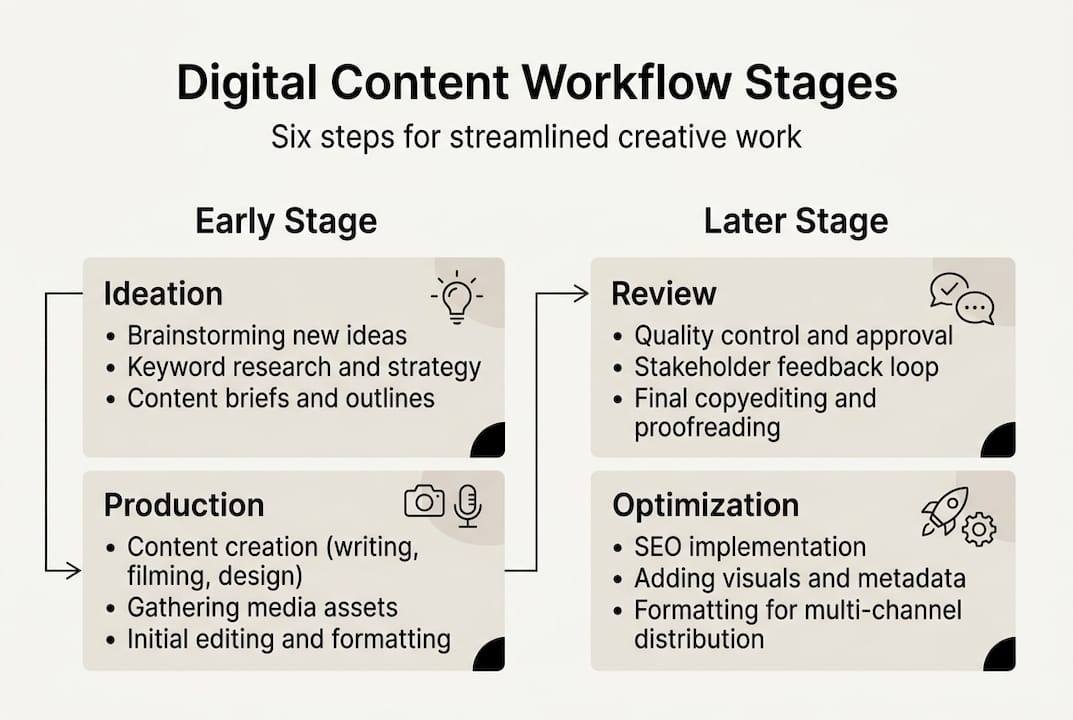
Understanding the definition is one thing. Knowing how to actually move through a workflow is another. Typical workflows involve 4 to 7 sequential stages with defined roles and event-triggered transitions, meaning each stage only begins when the previous one is formally complete.
Here is how those stages break down for creative professionals:
- Ideation: This is where concepts, references, and emotional directions are gathered. For musicians, this might mean mood references and lyric themes. For visual artists, it could be color palettes and style references.
- Production: Assets are created here. This includes drafting, recording, designing, or generating visuals. AI tools can accelerate this stage significantly.
- Review and approval: Stakeholders give feedback. This stage needs clear version control to avoid confusion over which file is current.
- Optimization: Assets are refined based on feedback, resized for different platforms, and prepared for distribution.
- Distribution: Content goes live across channels, whether that is a streaming platform, social media, or a press release.
- Archival and analysis: Assets are tagged, stored, and analyzed for performance. This data informs the next ideation cycle.
| Stage | Key action | Common tool type |
|---|---|---|
| Ideation | Concept gathering | Mood boards, briefs |
| Production | Asset creation | Design, AI generation |
| Review | Feedback and approval | Collaboration platforms |
| Optimization | Refinement and formatting | Editing software |
| Distribution | Publishing | Scheduling tools |
| Archival | Tagging and storage | DAM platforms |
Pro Tip: Set a version naming convention from day one. Something as simple as “AssetName_v01_YYYYMMDD” saves hours of confusion during the review stage.
For a more detailed look at how this applies to video content specifically, the YouTube workflow guide walks through platform-specific considerations. You can also explore digital asset workflows for a technical breakdown of how assets move through automated systems.
Best practices for creative digital workflows
Knowing the stages is not enough. The difference between a workflow that works and one that collapses under pressure comes down to how well it is set up and maintained. Clear roles, version control, centralized DAM, and metadata tagging are the core best practices that separate high-functioning creative teams from chaotic ones.
Here is what each of those looks like in practice:
- Define roles with a RACI framework: RACI stands for Responsible, Accountable, Consulted, and Informed. Assigning each role to each task removes ambiguity and prevents duplicated effort.
- Centralize your assets: A digital asset management (DAM) platform gives everyone access to the right files without the back-and-forth of email attachments.
- Tag everything with metadata: Whether you use AI-assisted auto-tagging or manual labels, metadata makes assets searchable and reusable. This is especially valuable for musicians managing large catalogs of stems, artwork, and promotional files.
- Use version control consistently: Every draft should be saved as a new version, not overwritten. This protects against accidental loss and makes rollbacks easy.
- Automate repetitive tasks: Resizing assets for different platforms, sending approval notifications, and archiving completed files can all be automated, freeing you for the creative work that actually requires your attention.
- Build in agile iteration cycles: Rather than waiting until the end to review everything, build short feedback loops into each stage. This catches problems early and keeps momentum going.
Pro Tip: When building your visual identity guide for a release, create a locked asset folder that only contains approved finals. This prevents anyone from accidentally using a draft version in live materials.
Strong hooks for social content also depend on having the right assets ready at the right time. A workflow that keeps your visuals organized means you can move fast when a trending moment calls for it. For a broader look at asset management standards, digital asset management best practices covers the technical foundations worth knowing.
Edge cases, challenges, and advanced strategies
Even well-designed workflows run into problems. Understanding where things break down, and why, helps you build systems that are resilient rather than fragile.
Common pitfalls for creative teams include:
- Version conflicts: Two team members edit the same file simultaneously, creating competing versions with no clear winner.
- Approval bottlenecks: A single gatekeeper holds up the entire pipeline because the review process is not structured or time-bound.
- Metadata inconsistencies: Assets are tagged differently by different people, making them nearly impossible to find later.
- AI hallucination: AI-generated content sometimes produces outputs that look plausible but are factually or visually incorrect. Human review is non-negotiable.
- Asset loss: Files saved in personal folders rather than centralized systems disappear when team members leave or change devices.
| Workflow type | Strengths | Weaknesses |
|---|---|---|
| Traditional/manual | Full human oversight, creative nuance | Slow, labor-intensive, error-prone |
| AI-hybrid | Fast, scalable, consistent | Requires human review, AI errors possible |
Hybrid AI-human workflows deliver 40% productivity gains and 67% performance improvements, making them the clear choice for teams that need both speed and quality. But the gains only materialize when human oversight is built into the process, not treated as optional.
For creative professionals, the most effective advanced strategy is to treat AI as a production accelerator and humans as quality gatekeepers. AI handles generation, resizing, tagging, and formatting. Humans handle judgment calls about tone, style, and creative integrity. This division of labor is what makes hybrid workflow strategies actually scale without sacrificing the work’s character.
You can find more artist workflow insights on the Orias blog, covering how other creators are navigating these exact challenges in real production environments.
Editorial perspective: The real secrets to workflow success for creatives
Most workflow advice focuses on tools. Pick the right DAM, use the right project management software, automate this task or that one. But in practice, workflows fail most in transitions, not in creation. The moment an asset moves from one person or stage to the next is where clarity breaks down, files get lost, and creative intent gets diluted.
The uncomfortable truth is that no tool fixes a hand-off problem. That requires deliberate orchestration: clear ownership at every transition point, defined triggers for what moves a task forward, and a shared understanding of what “done” means at each stage.
AI is genuinely useful for speeding up production and reducing repetitive work. But it cannot replace the judgment that keeps a creative project coherent. A musician’s visual identity, a photographer’s editorial voice, a filmmaker’s pacing instinct: these are not things an algorithm preserves without guidance.
What actually separates high-output creatives from overwhelmed ones is not the sophistication of their tools. It is the clarity of their process. When transitions are smooth and roles are explicit, deep work becomes possible. That is where real storytelling happens. If you want to build that kind of clarity into your own process, creative workflow tips are a practical next step.
Ready to streamline your creative workflow?
If this article clarified how digital content workflows actually function, the next step is putting that structure into practice with tools built for the way creatives actually work.

Orias AI is designed specifically for artists, musicians, and visual storytellers who need to move from rough concept to publish-ready assets without the usual chaos. The platform supports every stage of the workflow: ideation, visual generation, asset refinement, and export for campaigns or releases. You can shape mood, generate variants, and produce consistent creative packs without losing hours to manual back-and-forth. Explore workflow best practices to see how other creators are building smarter systems, then bring those principles into your own work.
Frequently asked questions
What are the main stages in a digital content workflow?
A digital content workflow typically moves through six stages: ideation, production, review and approval, optimization, distribution, and analysis. Core stages follow a defined sequence with clear triggers between each step.
How can artists and musicians benefit from a digital content workflow?
Workflows help artists and musicians keep promotional assets organized, capture their creative process systematically, and produce release materials faster. Digital workflows for artists support process capture, auto-tagging, curation, and packaging for licensing or promotional use.
What tools and integrations are commonly used to support creative workflows?
Popular tools include the Adobe suite for production, Asana for task management, Midjourney or Flux for AI image generation, and centralized DAM platforms for asset storage. Integration with creative tools and a centralized DAM are considered core best practices for managing creative assets at scale.
What are common workflow pitfalls for creative teams?
The most frequent issues are version conflicts, approval delays, metadata inconsistency, AI-generated errors, and asset loss from decentralized storage. Edge cases like bottlenecks and metadata gaps are especially common when workflows lack defined hand-off points.
How much can efficient workflows save creative teams in time and costs?
Agencies using hybrid AI-human workflows report cost reductions of 75 to 90% and productivity boosts of 40 to 67%. Hybrid AI-human approaches consistently outperform fully manual workflows in both speed and output quality.
Recommended
- Boost creativity: best practices for an efficient creative process - Orias AI
- AI Creative Workspace for Visual Storytellers, Content Creators and Artists - Orias AI
- Master the creative workflow for YouTube: a practical guide - Orias AI
- Blog | Creative Workflows for Artists & Musicians - Orias AI
- Unlock Effective Content Repurposing Strategies Today | Prodcast
- Content Marketing Workflow: Complete Guide for 2025 - Jarrod Harman


