
Step-by-step AI content creation process for artists
Unlock the secrets of a seamless content creation process for artists. Elevate your workflow and streamline your projects with our step-by-step guide!
TL;DR:
- AI-driven workflows significantly reduce the time spent on production logistics for artists and content creators.
- Structured processes, including ideation, prompt engineering, iterative refinement, and post-processing, maximize efficiency and consistency.
- Human judgment, curation, and ethical considerations remain vital for creating distinctive, meaningful work at scale.
You have a concept in your head, a deadline on your calendar, and three half-finished mood boards on your desktop. Sound familiar? Most artists and content creators spend more time wrestling with production logistics than they do actually creating, and that gap is exactly where momentum dies. AI-driven workflows change that equation. Instead of starting from scratch every time, you can move from raw idea to publish-ready promotional assets in a fraction of the time, without sacrificing the artistic intent that makes your work worth sharing. This guide walks you through every phase, from tool setup to final distribution.
Table of Contents
- What you need to start: Tools and prerequisites
- Phase 1: Fast ideation and concept generation
- Phase 2: Image generation and iterative refinement
- Phase 3: Post-processing and creating promotional assets
- Troubleshooting, ethical risks, and advanced tips
- One artist’s truth: The right balance is everything
- Explore more efficient AI workflows with Orias AI
- Frequently asked questions
Key Takeaways
| Point | Details |
|---|---|
| Start with the right tools | AI models and classic design apps both play key roles in a streamlined workflow. |
| Let AI speed up ideation | Language and image models accelerate concept development, freeing time for creative judgment. |
| Iterate, refine, and curate | Human oversight in selection and revision delivers distinctive, high-impact assets. |
| Address pitfalls early | Fix artifacts, uphold ethics, and avoid over-reliance to maintain quality and originality. |
What you need to start: Tools and prerequisites
To create efficiently, you need the right tools and a bit of prep before jumping in. Jumping straight into generation without preparation wastes time and produces inconsistent results. A few minutes of setup at the start of a project saves hours down the line.
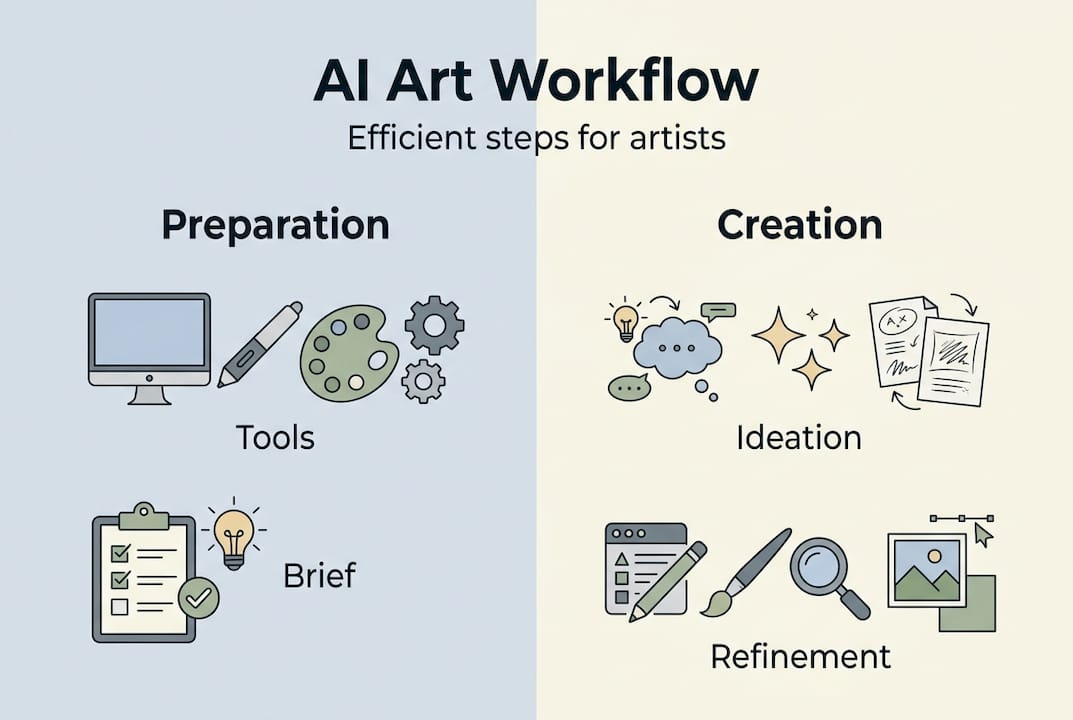
Structured AI workflows for artists typically follow these phases: ideation and briefing with language models, prompt engineering for image generation, variation selection, iterative refinement, post-processing, and finally repurposing into promotional assets. Knowing this structure before you start helps you allocate time and energy to the right stages.
Core tools by category
| Category | Tools | Primary use |
|---|---|---|
| Language models | ChatGPT, Claude | Ideation, prompts, briefs |
| Image generators | Midjourney, Leonardo, ZSky | Visual generation |
| Refinement apps | Topaz, Adobe Firefly | Upscaling, inpainting |
| Design software | Photoshop, Canva | Post-processing, layout |
What you need before your first session
- A reference folder. Gather 5 to 10 images that represent the mood, palette, or style you want. These become your visual anchor throughout the project.
- A one-sentence creative brief. Force yourself to describe the concept in a single sentence. Vague intentions produce vague outputs.
- Basic prompt writing skills. You don’t need to be an expert, but learning how to describe style, lighting, composition, and subject matter clearly makes every generation more accurate.
- Post-processing basics. Knowing how to adjust color, crop for platform ratios, and remove artifacts in Photoshop or Canva keeps you from being blocked at the finish line.
Following creative process best practices from the start reduces rework significantly. A structured workflow for artists is not about rigidity. It is about removing decision fatigue so your creative energy goes toward the work itself.
Pro Tip: Keep a “prompt library” document where you save prompts that worked well. Over time, this becomes a reusable resource that dramatically speeds up future projects.
Phase 1: Fast ideation and concept generation
Once your tools are ready, it’s time to generate and clarify your concepts quickly. This phase is where most creators either gain serious momentum or stall. The goal is not to have a perfect idea. The goal is to have enough good ideas to choose from.
Language models are powerful here. Give ChatGPT or Claude your one-sentence brief and ask it to generate five mood directions, three color palette suggestions, and a list of visual metaphors that connect to your theme. What you get back is raw material, not finished work, but it saves 30 to 60 minutes of independent brainstorming.
A practical ideation sequence
- Feed your brief to an LLM. Describe your project, your audience, and the emotional response you want the work to trigger. Ask the model to return visual concepts, not just written descriptions.
- Use prompt chaining. Take the strongest concept from step one and ask the model to expand it: add specific lighting conditions, camera angles, texture suggestions, and cultural references that reinforce the idea.
- Generate thumbnail sketches. Use your refined prompts to produce low-resolution concept images in Midjourney or Leonardo. At this stage, quantity matters more than quality.
- Curate ruthlessly. Select the two or three outputs that feel closest to your intent. Delete the rest. This is where your human judgment becomes the most important part of the process.
- Refine your winning concept. Rewrite your prompt based on what worked and what didn’t in the initial generation. Add specifics about style, era, composition, and mood.
“The most effective AI-driven workflows treat language models as ideation partners, using prompt chaining for multi-stage generation to progressively narrow a broad idea into a precise visual direction.”
A real example: a musician creating cover art for an ambient EP might start with “a quiet coastal landscape at golden hour, melancholy but hopeful.” The LLM expands this into a set of specific visual prompts, each emphasizing different compositional choices, such as wide aerial, intimate close-up, or abstract color field. The artist runs all three through an image generator, then picks one direction to carry forward.
Following storytelling ideas with AI helps you push concepts further than you might on your own, especially when you’re producing work across multiple releases and need fresh angles each time.
The key discipline is staying in this phase only as long as necessary. Some creators get stuck generating endlessly without committing. Set a time limit of 45 minutes for ideation, then move forward with what you have.
Phase 2: Image generation and iterative refinement
With strong concepts in hand, the next step is turning visions into images and refining results. This is where the real time savings become visible, and where the process requires both patience and structure.
The core generation loop
- Submit your refined prompt to your image generator of choice.
- Review the four to eight variations produced.
- Select the one or two outputs closest to your visual intent.
- Identify exactly what is wrong or off about them. Be specific: “the lighting is too harsh,” “the subject’s hands look warped,” “the color temperature is too cool.”
- Revise the prompt or use img2img to feed the best output back into the generator with corrective instructions.
- Repeat until the result is strong enough to move into post-processing.
Research shows that this iterative refinement via img2img and inpainting is what separates polished professional results from generic AI output. Skipping this step produces work that looks clearly machine-made and lacks the specificity that makes visuals memorable.
Semantic validation vs pixel-based review
| Method | How it works | Success rate |
|---|---|---|
| Pixel-based review | Manual visual check for obvious errors | ~70% accuracy |
| Semantic validation | AI evaluator checks if the image matches the intent | ~100% accuracy |
Empirical workflow benchmarks show up to a 9x speed improvement when using structured AI workflows, with teams of two matching the output of five-person teams. Visual production time drops by 70 to 85%, and rework decreases by 60% when guardrails like semantic validation are in place. Artists also recover five to seven hours per week that were previously spent on marketing asset creation.
These are not theoretical numbers. They reflect the real payoff of committing to an iterative process rather than trying to get everything right in a single generation.
Understanding what a digital workflow actually means in practice helps you treat each generation round as a step in a repeatable system rather than a one-off gamble.
Pro Tip: Never chase perfection in a single generation session. Aim for “good enough to refine further” at each step. Three rounds of small improvements outperform one round of chasing a perfect output every time.
Phase 3: Post-processing and creating promotional assets
After your artwork looks polished, it’s time to adapt it for promotion and distribution. This phase is where your image becomes a campaign, and it’s where consistency across platforms either makes or breaks your release.
Steps from final image to publish-ready assets
- Select your finals. Choose one to three hero images that represent the best of your generation and refinement work.
- Upscale for high-resolution use. Use a tool like Topaz Gigapixel or Adobe Firefly to bring images to print or screen resolution without quality loss.
- Open in Photoshop or Canva for layout. Add text, adjust contrast for different backgrounds, and apply any final color grading that reinforces your brand palette.
- Export in platform-specific formats. Instagram requires different crop ratios than YouTube thumbnails or email headers. Create separate exports for each placement.
- Build a promo asset pack. Organize final files by platform and usage type so you can execute a release without last-minute scrambling.
Platforms to cover in every release
- Instagram posts and Stories (1:1 and 9:16 ratios)
- YouTube thumbnail and channel art
- Spotify or streaming platform cover art (3000 x 3000 pixels)
- Email header or newsletter image
- Website banner or press kit image
- Twitter or X card images
Following the principle of repurposing into promotional assets means you generate a visual once and extract maximum value from it across every distribution channel. Custom training models on your brand’s existing art also ensures style consistency across multiple releases, making your catalog look cohesive rather than fragmented. Tracking ROI through time saved and output volume helps you measure whether your workflow is actually improving.
Check out the promo visuals guide for specific formatting advice, and the visual tips for music releases if you’re producing assets for an album or EP drop.
Troubleshooting, ethical risks, and advanced tips
Even with strong processes, challenges and ethical considerations arise along the way. Knowing what to expect and how to respond quickly keeps your project on track without derailing your momentum.
Common issues and fast fixes
- Warped hands or distorted faces. Use inpainting to isolate the problem area and regenerate only that section. Do not redo the entire image.
- Text illegibility in generated images. Never rely on AI to render readable text. Add all typography manually in Photoshop or Canva after generation.
- Style drift across a series. If you are producing multiple images for a campaign, artifacts and inconsistent styles creep in as prompts vary. Use a locked style reference image and semantic validation to maintain visual coherence.
- Low resolution outputs. Start with a smaller, faster generation to confirm the concept, then switch to high-resolution generation only for approved finals.
- Brand inconsistency across platforms. Custom-trained models built on your existing catalog maintain style consistency far more reliably than prompt-only approaches.
Pro Tip: Build a “style lockdown prompt” that contains all your core visual parameters, such as palette, lighting style, era, and mood, and prepend it to every new prompt in a series. This single habit reduces style drift by a significant margin.
Ethical considerations worth taking seriously
The speed and power of AI generation come with responsibilities that are easy to overlook when you’re focused on output.
Use ethically sourced training data and favor platforms that are transparent about their data practices. AI as a collaborator, not a replacement, means measuring success by real-world human impact, such as emotional reactions, sales, and engagement, rather than simply by how fast you produced something.
The case for AI in creative work is real: it amplifies creativity and can produce 100 or more unique assets at a scale no single person could manage alone. But the counterargument is equally worth hearing: AI lacks the lived experience that gives art meaning, and over-reliance risks producing work that is technically competent but emotionally hollow. Artists using AI most successfully tend to treat it as a fast-moving sketchbook, not a finished-art machine.
Explore AI tool alternatives if your current toolset is not meeting your needs for consistency, ethical sourcing, or output quality.
One artist’s truth: The right balance is everything
Beyond troubleshooting, it’s worth reflecting on what makes for truly outstanding creative work in an AI-driven era. The tools have gotten remarkable. But the gap between fast output and meaningful work is still determined entirely by human judgment.
AI excels at accelerating repetitive and mechanical tasks, freeing you to focus on curation, intent, and the questions that actually matter: Does this image say what I want it to say? Does it feel like me? Would I be proud to put my name on it?
Quantity without curation is noise. Generating 200 variations and choosing none of them because nothing feels right is not a workflow problem. It is a judgment problem, and no tool fixes that for you.
The most distinctive creative work in an AI era will belong to people who use these tools with strong editorial instincts. That means knowing when to stop generating and start deciding. It means resisting the temptation to keep tweaking indefinitely. And it means understanding that your taste, accumulated through years of looking, making, and responding to the world, is the actual product. The AI just helps you express it faster.
A practical workflow for creators is only as strong as the creative vision guiding it. Build the habit of asking “does this serve the work?” at every stage, and your output will stay distinctive no matter how the tools evolve.
Explore more efficient AI workflows with Orias AI
If you’re ready for the next level, try hands-on tools built for your creative needs.
Orias AI is built specifically for creators who want to move from concept to campaign without losing their creative voice in the process. The platform brings ideation, visual generation, refinement, and promotional asset production into one focused workspace, so you spend less time managing tools and more time making decisions that matter.

Whether you’re preparing a music release, a visual campaign, or an ongoing content series, the creative workflows blog offers practical guides tailored to your process. Start with the resources that match where you are right now, and build from there.
Frequently asked questions
What AI tools do most artists use for visual content creation?
Most artists use a mix of language models like ChatGPT for ideation, image generators such as Midjourney, ZSky, or Leonardo for visuals, and design tools like Photoshop or Canva for final edits.
How much faster can AI make the art creation process?
Benchmarks show up to a 70 to 85% reduction in production time and a 9x speed-up in overall workflows by using AI-powered processes with structured iteration.
What are the main risks of using AI for content creation?
Major risks include style drift and image artifacts such as warped hands or inconsistent styles, as well as over-reliance on automation, ethical issues around training data, and the potential loss of human touch that makes work feel distinctive.
How can I keep my AI-generated artwork consistent with my brand?
Custom train models using your branded art and use semantic validation to check that each output aligns with your established visual identity before finalizing any asset.


