
How AI transforms content creation and creative work
Discover the transformative role of AI in content creation. Learn how professionals blend AI with creativity to enhance their workflows and output.

TL;DR:
- AI integrates into content creation by handling research, drafting, visuals, and optimization within structured workflows.
- Combining AI speed with human judgment enhances creative scale while maintaining brand authenticity and quality.
- Human oversight remains crucial for ensuring factual accuracy, brand consistency, and cultural relevance in AI-generated content.
There is a persistent myth that AI-generated content is a shortcut for amateurs who lack real creative skill. That idea is worth pushing back on. Professional creators, musicians, and marketers are using AI right now to build campaign visuals, release assets, and branded content at a scale and speed that manual workflows simply cannot match. The real question is not whether AI belongs in your process. It is how to use it without losing the creative edge that makes your work recognizable. This guide gives you a clear, honest look at where AI earns its place, where it falls short, and how to combine it with human judgment for the best output.
Table of Contents
- How AI fits into modern content creation
- The real benefits: Speed, scale, and creative options
- What AI still can’t do: Weaknesses, risks, and edge cases
- Getting the most from human-AI collaboration
- Why expert guidance remains essential in the age of AI
- Streamline your creative workflow with Orias AI
- Frequently asked questions
Key Takeaways
| Point | Details |
|---|---|
| AI boosts content volume | AI tools let you produce more visual and written assets quickly and efficiently. |
| Human oversight protects quality | Edits and strategy from real creators ensure content stays on-brand and effective. |
| Hybrid workflows are optimal | Combining AI for speed with human creativity results in the best campaign outcomes. |
| AI has creative limits | Automation still struggles with precise brand details, facts, and originality. |
How AI fits into modern content creation
Having set up the excitement and skepticism around AI, let us break down exactly how AI embeds itself in your creative process.
The modern AI-assisted workflow is not a single tool doing one job. It is a connected system of steps where different AI functions handle different phases of production. According to agentic workflow research, AI assists in content creation through agentic workflows, retrieval-augmented generation (RAG), prompt engineering, and fine-tuning, where large language models predict tokens and chain tasks across research, drafting, and optimization stages. That is a technical way of saying AI can move from gathering information to structuring ideas to generating finished text or visuals, all within one guided pipeline.
The structured prompting approach powers this whole system. A well-formed prompt includes five parts: the role you want AI to play, the context around your project, the specific task, any constraints like brand tone or word count, and the format you want delivered. When you build prompt templates using your own brand documents, the output quality jumps significantly because the AI has real reference material to work with rather than guessing at your style.
Here are the main tasks AI handles well in a modern content pipeline:
- Text generation: Blog drafts, social captions, email subject lines, and campaign copy
- Image and visual asset creation: Mood boards, promotional imagery, album artwork concepts, and storyboard frames
- Content repurposing: Transforming a single long-form piece into short clips, quote cards, or carousel posts
- Campaign visuals: Generating multiple style variants for A/B testing or platform-specific formatting
- Research and summarization: Pulling relevant data into usable briefs before writing begins
For best practices for efficient creativity, structured prompting and brand-aligned documents are two of the most impactful habits to build early in your AI-assisted workflow.
Pro Tip: Store your brand guidelines, tone references, and sample outputs as a document you feed into every AI prompt session. This single habit reduces misaligned output by a significant margin and keeps visual and text assets cohesive across your entire release.
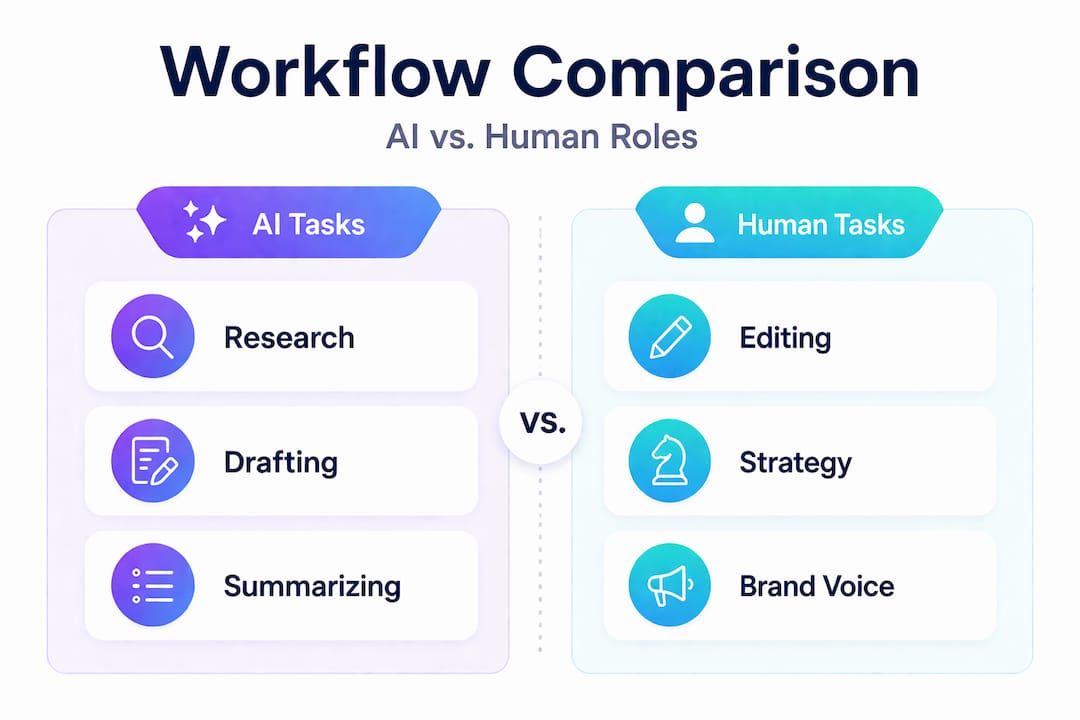
| Workflow stage | AI contribution | Human contribution |
|---|---|---|
| Research | Automated sourcing and summarizing | Validating relevance and accuracy |
| Ideation | Generating concept variations | Selecting and refining direction |
| Drafting | First-pass text or visual generation | Editing for voice and brand fit |
| Optimization | SEO structuring, caption variants | Final tone check and approval |
| Publishing prep | Formatting for platforms | Quality control and scheduling |
Understanding a digital content workflow is essential before introducing AI, because without clear stage ownership, the pipeline becomes chaotic and the output suffers.
The real benefits: Speed, scale, and creative options
After mapping the AI integration, it is time to see the real-life impact on your speed and output.
The numbers tell a compelling story. One documented AI content strategy produced 130 blog posts over 26 weeks at roughly the equivalent of a few dollars per post, a volume that would cost many times more in traditional production. Cost reductions of 30 to 60 times compared to fully human workflows are achievable when AI handles the volume and humans focus on strategy and refinement. That is not a marginal efficiency gain. That is a fundamentally different production model.

For creators and marketers, this volume advantage translates into real campaign opportunities. Instead of launching one visual direction for a music release or a product drop, you can generate six variations in the time it used to take to finalize one. A/B testing becomes practical. Seasonal refreshes become easy. Iteration, which is essential to any strong creative process, happens faster.
Here is a step-by-step process for moving from concept to final asset with AI:
- Define your creative direction: Write a clear brief that includes the mood, audience, platform, and purpose before opening any AI tool.
- Generate multiple first drafts: Use AI to produce at least three to five variations of text or visual concepts so you have real options to evaluate.
- Filter and select: Choose the strongest output based on brand fit, not just aesthetic appeal.
- Refine with human editing: Adjust tone, fix specifics, and ensure alignment with your campaign goals.
- Test and iterate: Use engagement data or internal feedback to guide the next round of generation and refinement.
- Export for platforms: Format the approved asset for each channel, using AI again to resize, rephrase captions, or adjust pacing.
For AI for visual storytelling, this kind of iterative, multi-variant approach produces stronger final assets because the creator is choosing from abundance rather than accepting the first result.
| Approach | Time to produce 10 assets | Estimated cost | Consistency risk |
|---|---|---|---|
| Pure AI | 2 to 4 hours | Very low | High (without oversight) |
| Human-only | 15 to 40 hours | High | Low |
| Hybrid (AI + human) | 5 to 10 hours | Moderate | Low |
The trade-off worth watching is perceived authenticity. Research shows that social AI boosts engagement in raw metrics but can lower how genuine an audience perceives a brand. This matters especially for artists and musicians whose audiences value personal connection. The hybrid model balances this by ensuring the human voice stays present in tone, storytelling, and final approval.
What AI still can’t do: Weaknesses, risks, and edge cases
Knowing the advantages is key, but it is just as vital to see where AI falls short.
The limitations of AI in creative work are specific and worth understanding in detail. AI struggles with brand constraints including logos, custom fonts, precise spatial reasoning, and numbers in design. When you ask a diffusion model to place your exact logo in a layout, it often redraws or distorts it. When you need a visual with accurate numerical data, it tends to hallucinate or misplace elements. These are not bugs that will be patched soon. They reflect how these models fundamentally process and generate images.
Here are the four highest-risk areas for creators relying too heavily on AI:
- Hallucination: AI can state facts confidently that are simply wrong, which poses a serious problem for campaign credibility and factual content.
- Deindexation risk: AI content ranks 23% lower without human editing, which means unreviewed AI output can damage your search visibility.
- Originality gaps: AI synthesizes from existing training data, which means it tends toward averaged, familiar outputs rather than genuinely fresh creative ideas.
- Factual mistakes in visuals: Charts, infographics, and data-heavy visuals generated by AI often contain errors in numbers or relationships between elements.
“LLMs are poorly suited for tasks requiring precise coordinate placement or bezier path logic. Diffusion models similarly struggle to faithfully reproduce logos or custom typefaces because they generate by approximation, not by reading specifications.” Based on findings from Why Graphic Design is Hard for Large Language Models.
This has a direct impact on brand-sensitive work. If you are preparing assets for a music release or a product launch, an AI-generated visual that misrepresents your brand elements can undercut the credibility you are trying to build. The 9.2% hallucination rate found in AI text generation is a meaningful number. Roughly one in ten AI-generated facts needs a correction.
For practical examples in AI in music release visuals, human review of brand alignment is treated as a mandatory step, not an optional one.
Pro Tip: Before publishing any AI-generated asset, run a brand accuracy check against your official guidelines. Verify that logos, colors, fonts, and key messages are represented exactly. This takes ten minutes and prevents campaign-level errors.
Getting the most from human-AI collaboration
With risks on the table, here is how to combine AI efficiency with human strategy for the best results.
The most effective teams treat AI and human contribution as distinct roles within the same pipeline, rather than trying to make AI do everything or resisting it entirely. Hybrid workflows consistently outperform both pure AI and human-only approaches when AI handles speed and volume while humans own strategy, voice, and verification.
Here is a practical numbered workflow for a hybrid pipeline:
- Human sets strategy: Define goals, audience, messaging pillars, and brand constraints before AI touches anything.
- AI generates the first layer: Use AI to produce multiple drafts, concept variations, or visual directions based on your structured brief.
- Human curates and selects: Review output for brand fit, originality, and accuracy. This is the most important filter in the pipeline.
- AI refines and scales: Use AI to produce platform-specific variants, alternate captions, resized formats, or additional visual options from the approved direction.
- Human does final edit: Adjust tone, confirm facts, polish language, and ensure the final asset represents the brand as intended.
- AI prepares for distribution: Format assets, generate metadata, or produce export-ready files for each channel.
For structured creative workflows, the key insight is that AI should occupy clearly defined phases, not float unpredictably through the entire process.
Additional tips for making hybrid workflows more effective:
- Batch your AI sessions: Generate all first-draft assets in one sitting, then shift to human review. Context-switching between the two modes wastes time.
- Keep a prompt library: Document your best-performing prompts so you can reuse and refine them across campaigns rather than starting from scratch.
- Set quality thresholds: Define what “good enough for review” means before you start generating, so you do not spend time evaluating weak outputs.
- Schedule human review early: Human review is not the last step. Build it into the middle of your pipeline so corrections happen before you invest in refinements.
- Maintain brand anchor documents: A single shared document with your brand voice, colors, key messages, and logo specifications gives AI consistent reference material and gives human reviewers a clear standard to check against.
Balancing speed, quality, and authenticity is the ongoing challenge in any AI-assisted creative practice. The goal is not to generate as much as possible. It is to generate efficiently and then invest human attention where it creates the most value.
Why expert guidance remains essential in the age of AI
Having explored how to blend human and AI strengths, let us talk honestly about the irreplaceable value of creative expertise.
Here is what the discourse often misses: AI produces outputs that are statistically likely, not outputs that are culturally resonant or strategically distinct. There is a real risk of creative homogeneity when too many creators use the same tools with similar prompts and minimal human intervention. The outputs start to look and sound alike. For artists and marketers who depend on standing out, this is a practical problem, not just an aesthetic concern.
Expert nuance demands human oversight for nuanced storytelling, cultural fit, and avoiding homogeneity. This is especially true in campaigns that cross cultural contexts, address sensitive topics, or require a distinct point of view. AI can approximate a voice. It cannot originate one.
Experienced creators bring something AI cannot replicate: the judgment to know which direction is worth pursuing, the cultural literacy to understand why a visual choice matters to a specific audience, and the strategic clarity to align a single asset with a longer-term creative vision. These are not soft skills. They are the skills that determine whether a campaign lands or gets ignored.
The practical lesson here is that AI works best as a production tool for creators who already know what they want to say. It accelerates the path from idea to asset. It does not replace the idea itself, or the expertise required to evaluate whether that idea is the right one. The best campaigns use creative process best practices to ensure that AI amplifies a clear creative direction rather than substituting for one.
Our view is that the creators who will get the most from AI are not the ones who use it the most. They are the ones who know exactly when to use it and when to trust their own judgment over the output.
Streamline your creative workflow with Orias AI
Ready to put this strategy to work? Here is a practical next step for creators and teams who want a workspace built specifically for this kind of structured, iterative production.

Orias AI is designed for the exact workflow this article describes: structured direction-setting, visual generation, iterative refinement, and publish-ready export, all within one focused environment. Whether you are preparing release visuals for a music drop, building a campaign asset pack, or developing a visual identity from scratch, the platform gives you the structure to move from rough idea to polished output without the manual overhead. Explore best practices for creative efficiency alongside the workspace to build a production habit that scales with your creative output.
Frequently asked questions
Does AI replace human content creators?
No. AI works best as a support tool, and human oversight remains essential for strategy, authentic voice, and campaign effectiveness. Volume is AI’s strength; originality and judgment are yours.
Why do AI-generated visuals sometimes look off-brand?
AI struggles with brand constraints like precise logos and custom fonts because it generates by approximation rather than by reading your specifications. Human editing is required to correct these mismatches before publishing.
How accurate is AI-generated text and visual content?
AI carries a 9.2% hallucination rate in text generation and similar distortion risks in visuals, making human fact-checking and brand review a non-negotiable part of any production pipeline.
What are agentic workflows in AI content creation?
Agentic workflows chain AI tasks across stages like research, drafting, and optimization, guided by structured prompts that define the role, context, constraints, and expected format for each step.


