How to create music promo assets that get noticed
Learn how to create music promo assets that drive streams and bookings. A step-by-step guide covering EPKs, cover art, social visuals, and more for independent artists.

TL;DR:
- Effective promo assets are crucial for capturing attention and advancing your music career.
- Use free or low-cost tools like Canva and GIMP to create consistent, high-quality visuals.
- Building a cohesive visual identity and regularly updating assets enhances long-term recognition.
Your song is amazing, but nobody’s listening. That gap between great music and actual attention often comes down to one thing: your promotional assets. In a landscape where playlists are crowded and social feeds move fast, your visuals and promo materials are frequently the first impression you make. Get them right and you open doors to streams, bookings, and press coverage. Get them wrong, and even a brilliant track disappears without a trace. This guide walks you through exactly which assets you need, which tools to use, and how to create materials that genuinely move the needle for your music career.
Table of Contents
- Essential promo assets every musician needs
- Pick the right creation tools for your assets
- Step-by-step: Create standout visuals and videos
- Distribute and update: Making your assets work for you
- What pros overlook about music promo assets
- Create, organize, and amplify your music promo assets with Orias AI
- Frequently asked questions
Key Takeaways
| Point | Details |
|---|---|
| Promo assets matter | Strong visuals and good EPKs boost your music’s reach and credibility. |
| Tools save time and money | Free or affordable DIY design tools let you create pro-level assets without big budgets. |
| Consistent branding wins | A cohesive look and message helps you stand out and stick in people’s minds. |
| Update regularly | Keep your assets fresh to maintain engagement and adapt to new opportunities. |
Essential promo assets every musician needs
Now that you know why promo assets are essential, let’s get clear on exactly what you need. Think of your promo assets as a toolkit, and each piece serves a specific function depending on where you’re promoting and who you’re reaching.
Core asset types every independent artist should have:
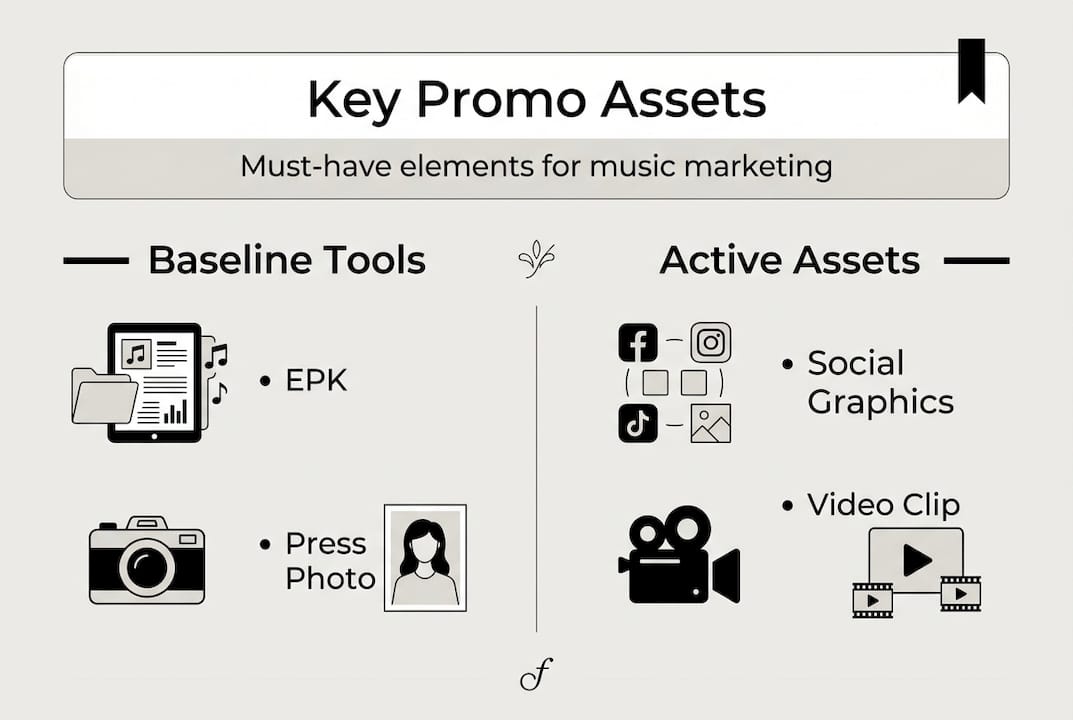
- EPK (Electronic Press Kit): A digital portfolio containing your bio, photos, music links, stats, and contact info. This is what you send to blogs, venues, and booking agents.
- One-sheet: A single-page, print-ready summary of your release. Shorter than an EPK, designed for quick pitches.
- Album or single cover art: Your primary visual identity for any release. It appears on streaming platforms, social posts, and press mentions.
- Lyric posts and social visuals: Shareable graphics built around your lyrics, announcements, or release dates, formatted for Instagram, TikTok, and X.
- Video teasers: Short clips, typically 15 to 30 seconds, that preview a track or build anticipation before a release.
Each asset plays a different role in your promo cycle. Your EPK handles professional outreach. Your social visuals drive organic reach. Your cover art sets the tone on every platform where your music lives. Skipping any one of these creates gaps that competitors without better music can exploit simply by showing up more professionally.
For visual tips for music releases, the stakes are real. Poor visuals kill streams in under three seconds, which means a weak cover or blurry promo graphic costs you real listens before anyone hears a note.
| Asset | Primary use | Key requirement |
|---|---|---|
| EPK | Press and booking | Current stats, pro photo |
| One-sheet | Short pitches | Concise, single-page format |
| Cover art | Streaming and social | High resolution, on-brand |
| Lyric posts | Organic social reach | Eye-catching, text-forward |
| Video teaser | Pre-release hype | Hook in first 2 seconds |
“Your visuals don’t just support your music; they often determine whether anyone clicks to hear it at all.”
Pick the right creation tools for your assets
With your asset checklist in hand, it’s time to choose the best tools for creating each promo item. The good news is that you don’t need a big budget to produce professional-looking materials.

Canva, GIMP, and smart link tools are consistently recommended for independent artists, covering everything from cover art to EPK layouts. DIY graphics save $100+ versus hiring a designer for every release, which adds up quickly when you’re putting out music regularly.
Comparison of popular tools for music promo assets:
| Tool | Cost | Best for | Skill level |
|---|---|---|---|
| Canva | Free / $13/mo Pro | Social visuals, one-sheets | Beginner |
| GIMP | Free | Cover art, custom graphics | Intermediate |
| Bandzoogle | From $10/mo | EPK pages, websites | Beginner |
| Soundplate | Free | Smart links, promo pages | Beginner |
| MusicTickers | Free | Real-time streaming stats | Beginner |
For artists just starting out, Canva covers the bulk of social visuals and one-sheets with minimal learning curve. If you want more control over your cover art, GIMP offers professional-grade editing at no cost. Bandzoogle handles your EPK and artist website in one place, while Soundplate lets you consolidate streaming links for press outreach.
Pro Tip: Consistency across your visuals matters more than complexity. A simple, cohesive color palette and font set used across all your assets builds recognition faster than a series of elaborate but mismatched graphics. Resources on building a strong visual identity and promo visuals creation tips can help you establish that consistency from the start.
Steps for picking and setting up a new creation tool:
- List the specific assets you need for your next release.
- Match each asset type to the tool that handles it best based on the table above.
- Sign up for free tiers first before committing to paid plans.
- Set up your brand kit (logo, colors, fonts) inside the tool before creating anything.
- Create one test asset, gather feedback, then build the rest of your release materials.
Exploring top asset creation alternatives is worth your time if you want options beyond the most common tools.
Step-by-step: Create standout visuals and videos
After selecting your tools, let’s break down exactly how to craft each asset for maximum impact. Having a clear process for each asset type removes guesswork and speeds up your workflow considerably.
Creating cover art in Canva or GIMP:
- Start with a 3000x3000 pixel canvas to meet streaming platform requirements.
- Choose a visual concept that reflects the emotional tone of the track, not just what looks trendy.
- Use two to three colors maximum and one primary font for readability at small sizes.
- Export as PNG or JPEG at 300 DPI for print use and 72 DPI for digital distribution.
- Test how it looks in a playlist row at thumbnail size before finalizing.
Building your EPK or one-sheet:
A strong EPK needs four things: a high-resolution press photo, a short factual bio, your current streaming stats, and clear contact information. Personalize your EPK for every pitch target, whether that’s a venue, a blog, or a radio station. What a festival booker needs to see is different from what a music journalist wants.
Pro Tip: Avoid writing a generic bio that could belong to anyone. Anchor it in specific details, a notable venue you’ve played, a collaboration, or a measurable result. Specificity builds credibility instantly.
Short-form video for TikTok and Reels:
Your hook must land in the first two seconds or you lose the viewer. Use better hooks for music videos to grab attention fast, whether that’s a lyric line, a visual surprise, or a direct statement. Lyric visuals work especially well on Reels because they give viewers something to follow while the track plays. And don’t underestimate well-written music captions for engagement to extend reach in comments and shares.
Common mistakes to avoid:
- Overstuffing your EPK with every detail of your career history
- Using off-brand visuals that don’t match your music’s tone or color palette
- Exporting cover art at low resolution and losing quality on streaming platforms
- Writing a one-size-fits-all bio instead of adapting it for each recipient
- Skipping the hook in teaser videos and leading with slow builds
Distribute and update: Making your assets work for you
Once your promo assets are ready, your next step is to make sure they’re seen and remain relevant. Creating assets and leaving them static is one of the most common oversights independent artists make.
Where to deploy your assets:
- Streaming platforms: Upload cover art and update your artist profile photo when you release new music.
- Social media: Schedule lyric posts, teaser videos, and behind-the-scenes content in the weeks leading up to and following a release.
- Press and blogs: Send your EPK to music blogs, podcasts, and journalists covering your genre.
- Booking outreach: Use your one-sheet and EPK when pitching venues and festival promoters.
- Smart link pages: Aggregate all your streaming links in one place and share this URL across channels.
Tracking performance tells you which assets are actually working. Monitor engagement on social posts, track streams after a visual update, and check response rates on press pitches. If your EPK is generating zero replies, the design or content needs revisiting.
Tailor your EPK for every target audience, skip the buzzwords, and make sure your streaming numbers and contact info stay current. An EPK with outdated stats reads as unprofessional, regardless of how good the music is. For deeper guidance on managing your creative process efficiently, resources on efficient creative workflows are well worth bookmarking.
Must-update triggers to keep in mind:
- New single or album release
- Significant milestone (streams, followers, notable press mention)
- New press photo or brand refresh
- Upcoming tour dates or festival appearances
- Change in contact information or booking representation
Consistently refreshed content keeps your presence active and signals to algorithms and tastemakers alike that you’re an artist worth paying attention to.
What pros overlook about music promo assets
Stepping back, here’s a hard-won perspective every musician should consider before their next release. Most articles focus on tools, templates, and checklists. That’s useful, but it misses the bigger picture.
The artists who build lasting recognition aren’t the ones with the flashiest graphics. They’re the ones who repeat a consistent visual and emotional world across every touchpoint, every release, every post. Consistency and branding create artist recognition far more reliably than any single polished asset ever will.
The mistake we see constantly is conflating software capability with creative intent. You can have access to every design tool on the market and still produce assets that feel random and disconnected. The question isn’t “what tool should I use?” It’s “what feeling am I trying to reinforce every time someone sees anything connected to my music?”
Building a world around your music, a recognizable palette, a recurring visual motif, a consistent tone in every caption and post, does more for long-term career growth than a one-off polished release campaign. Tactical assets matter. But without the magnetic visual identity holding everything together, even great individual assets become noise.
Create, organize, and amplify your music promo assets with Orias AI
If you’re ready to take your music’s promo assets to the next level, here’s how Orias AI can help. Creating release visuals, managing variants, and keeping your brand consistent across campaigns takes real time and mental energy.

Orias AI for music promo assets is built specifically for creators who need to move from concept to publish-ready output without the friction. You can shape mood, generate visual directions, produce caption alternatives, and export complete creative packs for a drop or campaign, all inside a focused workspace designed for iteration. Whether you’re prepping for a single release or managing a full album rollout, the creative workflows guide gives you practical frameworks to work faster and stay consistent. Stop spending hours on individual assets and start building a visual system that scales with your music.
Frequently asked questions
What is an EPK and why do I need one?
An EPK (Electronic Press Kit) is a single-page portfolio with key info, visuals, and links that makes pitching your music quick and professional. Without one, you’re asking press and venues to do extra research they simply won’t bother with.
Do I need expensive software to create promo assets?
No. Free tools like Canva, GIMP, and Bandzoogle cover nearly every asset type an independent artist needs at little to no cost.
How can I make my music visuals stand out?
Focus on consistent branding first. Consistent branding drives recognition more reliably than high production value, so build a repeatable visual system before chasing complexity.
Where should I share my music promo assets?
Distribute across multiple channels, including social platforms, streaming profiles, press outreach, and direct booking pitches, to maximize the return on every asset you create.